


Des Moines Register
2.3214.00 Reviews
App Specs
- Version
- 8.10.3
- Updated On
- License
- Free
- Downloads
- 50,000+
- Developer
- USA TODAY Co.
- Categories
- News & Magazines
- Platform
- Android
Screenshots






 Analysis by AppCompare
I usually judge a local news app by whether it helps me understand what is happening in one place without making me dig through a national feed. That is the useful idea behind the Des Moines Register: it is a news app from USA TODAY Co. aimed at readers who want a closer view of Des Moines and Iowa, alongside broader coverage. The emphasis on local reporting is its clearest reason to open it, especially when a national headline leaves the everyday consequences in your own community unanswered.
Keeping local news in reach
The app sits in the news and magazines category, and its focus makes it a different kind of choice from a general news aggregator. Those services can be convenient when I want a quick mix of headlines from many publishers; this one makes more sense when I want to follow a particular place. That distinction is practical: a local update can matter because it affects a commute, a school conversation, or a decision about what is happening nearby, not because it is the biggest story nationwide.
It is free to install, but that does not mean every part of the experience is necessarily free. In-app purchases are listed from $19.99 to $69.99 per item, so I would check the terms shown in the app before committing to a purchase or assuming that continued access to every article is included. If you only want to browse before deciding, start with the content you can access and read any subscription or purchase prompts carefully. That is a better approach than treating the download price as a promise of unlimited reading.
Local reporting is the main reason to open it
The app is most useful when a reader’s interests are tied to Des Moines or Iowa. National news apps are often stronger for scanning a broad selection of stories, but they may give a local development only a small amount of attention. A dedicated local publication can put that subject in context and make it easier to keep returning to the same area of coverage. I would use it alongside, rather than necessarily instead of, a broad news source if I wanted both local depth and a wide view of the day.
That does not mean every Iowa resident will want the same feed. Someone mainly interested in local civic life may value different stories from a reader who checks in for sports or general headlines. A useful habit is to decide what you need from the app before opening it: a quick check on what is happening around town, a closer read of a developing issue, or a visual look at a story. That small bit of intention makes a local news app easier to fit into a busy day.
How I would fit it into an ordinary day
Imagine checking the app over breakfast before making plans. I would scan the local headlines first, open only the stories that could affect my day, and save a longer read for a quieter moment if that option is available in the version I am using. If an article concerns a changing local situation, I would return later to see whether the reporting has developed rather than relying on one early update. This is where a publication focused on one region can be more useful than a general feed: the follow-up may matter as much as the initial headline.
For a practical routine, I would avoid treating every alert as an instruction to stop what I am doing. News notifications are best used selectively, especially if a phone is already busy with messages and calendar reminders. If the app offers alert controls on your device, keep only the notifications that genuinely help you act or stay informed, then check the rest when you have time. This reduces the chance that a breaking-news ping becomes background noise.
Worth Reading Before You Choose

EA SPORTS FC Mobile 26 Is a Bigger Football Game, but It Takes Time

Flipboard Shows What News Apps Must Do Beyond the Feed

Switching to Android Auto Means Rethinking Your Driving Routine

Google Calendar Makes a Crowded Week Easier to Manage

Ludo King Makes the Most of the Minutes Between Plans

Baby Panda World Brings Quick Play to Modern Phones, but Its Game Library Feels Busy
What the experience can and cannot promise
The app’s subject is its strength, but it also defines its limits. If I am looking for a broad international briefing, a local publication is not a substitute for a general news service. And if I live far from Iowa without a personal, work, or family connection to the region, many updates may feel less relevant. I would skip it as my only news app in those situations and choose a source with wider geographic coverage instead.
Access is another point to check as you use it. Although the app itself is free, the presence of in-app purchases means readers should not assume that every article or feature is included at no cost. Before starting a paid option, I would look at the price and terms displayed at the point of purchase, consider how often I expect to read, and confirm that the offer suits my budget. The listed purchase range is substantial enough that a quick review is worthwhile.
The app is rated for Everyone 10+, which is useful context for families deciding whether it is appropriate to have on a shared device. News can still cover serious or upsetting events, so I would not treat an age rating as a guarantee that every individual story is suitable for every child. For a younger reader, checking the article itself and discussing difficult coverage is more sensible than relying on the label alone.
Who gets the most from it
I would recommend giving it a try if you live in Des Moines, follow Iowa closely, or have a reason to keep track of the area from elsewhere. It may also suit someone who already reads national news but feels that local reporting is missing from their routine. The app has more than 50,000 installs, and its average rating is 2.2 from 474 ratings, so I would approach it with realistic expectations rather than assuming it will suit every device or reader. That public response is a reason to test the experience yourself, not proof that every person will encounter the same problems.
The current version is 8.7.1, and the minimum operating-system requirement is 8.0. Before installing, I would check that the device meets that requirement and has enough room for another app. The publication dates back to June 1, 2012, but what matters more to a new reader is whether its present-day coverage and access options match their needs. If you only want occasional headlines, a mobile browser or a broad news app may be enough; if you want a continuing connection to Iowa reporting, a dedicated app is easier to make part of a regular check-in.
Keeping It Local: What Is the Des Moines Register App?
The Des Moines Register is your go-to source for all things Iowa. Whether you’re into politics, sports, or just want to know what’s happening down the street, this app has you covered. It’s like having a personalized newspaper right in your pocket, but without the ink stains. Pretty neat, right?
User Interface and Navigation
Let’s talk about the user interface. I’ve gotta say, navigating through the app is a breeze. Everything is laid out in a way that makes sense, which is super important when you’re trying to catch up on the latest news in a hurry. The menu is clean, and the categories are easy to find. You won’t be scratching your head trying to figure out where to go next.
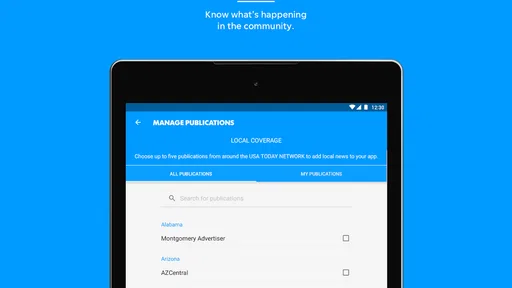
One of my favorite features is the “My Topics” section. You can customize this part to show only the news you care about. Whether you want to follow local politics or keep track of your favorite sports teams, it’s all just a tap away. It’s like having your own personalized news feed.
Content Quality and Features
Now, onto the juicy stuff – the content. The Des Moines Register app offers a wide range of stories, from breaking news to in-depth investigative pieces. The articles are well-written and provide a balanced view of the issues at hand. You can tell the journalists are passionate about their work, and it shows in the quality of the content.
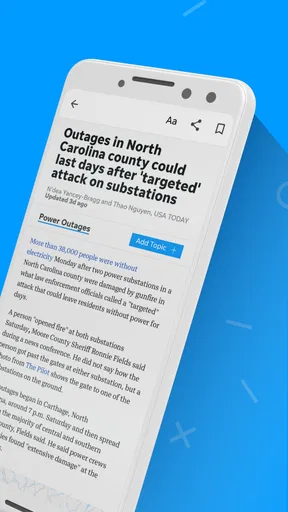
Another cool feature is the multimedia content. Videos and photo galleries accompany many articles, bringing the stories to life. It’s a great way to get a more immersive experience, especially if you’re a visual learner like me. Plus, there’s a section for opinion pieces, so you can get a feel for what the community is thinking.
Notifications and Updates
Notifications can be a blessing or a curse, depending on how they’re handled. Thankfully, the Des Moines Register app keeps it classy. You can choose to receive alerts for breaking news, top stories, or specific topics you’re interested in. This means you’ll never miss a beat without feeling overwhelmed by constant pings.
Updates are frequent, ensuring that you’re always in the loop. Whether it’s a storm warning or a major political announcement, the app makes sure you’re the first to know. It’s like having a personal news assistant keeping an eye on things for you.
Accessibility and Performance
In terms of accessibility, the app does a commendable job. Text size adjustments and a night mode make reading easier on the eyes, which is a big plus for night owls like me. Performance-wise, the app runs smoothly without any noticeable lag. Whether you’re on Wi-Fi or using mobile data, loading times are quick and seamless.
It’s also worth mentioning that the app is available on both Android and iOS, so no matter what device you’re rocking, you can stay informed. Just download it from the app store, and you’re good to go.
Final Thoughts
So, is the Des Moines Register app a must-have? If you’re living in Iowa or just have an interest in the area, I’d say it’s definitely worth a download. It’s packed with features that make staying informed easy, and the quality of content is top-notch. With customizable options and a user-friendly interface, it’s designed to fit seamlessly into your daily routine.
In a world where staying informed is more important than ever, having a reliable source of news at your fingertips is invaluable. So, go ahead and give the Des Moines Register app a try. You might just find it’s exactly what you’ve been looking for.
Pros
- Comprehensive local news coverage.
- User-friendly interface design.
- Regular updates with new features.
- High-quality investigative journalism.
- Customizable notification settings.
Cons
- Limited international news coverage.
- Subscription required for full access.
- Occasional app performance issues.
- Ads can be intrusive at times.
- Offline reading not always available.
FAQs for Des Moines Register
What is the Des Moines Register app used for?
The Des Moines Register app provides users with the latest local news, sports updates, and features from Des Moines, Iowa. It's designed to keep you informed with real-time notifications and in-depth coverage of local events, making it an essential tool for staying connected with the community.
Is the Des Moines Register app free to use?
The app itself is free to download on both Android and iOS devices. However, to access premium content and full articles, a subscription may be required. Users can explore some free articles daily, but subscribing offers an ad-free experience and additional features.
Does the Des Moines Register app have offline reading capabilities?
Yes, the app supports offline reading. Users can save articles and access them later without an internet connection. This feature is particularly useful for those who wish to read on the go or in areas with limited connectivity.
How often is the content updated in the Des Moines Register app?
Content on the Des Moines Register app is updated regularly throughout the day. Users receive real-time notifications for breaking news and significant updates. The app ensures that you stay informed with the latest developments as they happen.
Can I customize the news feed in the Des Moines Register app?
Yes, the Des Moines Register app allows users to customize their news feed. You can select specific topics or categories of interest, ensuring that you receive personalized content that matters most to you. This customization enhances user experience by filtering irrelevant news.


